
RUNMYBOT® Integration for HubSpot and Acumatica
1 Usage of this Document
This document serves as a reference for implementing a data synchronisation layer between HubSpot CRM and Acumatica ERP systems using the RUNMYBOT platform. It defines how each module is synchronised, how authentication is managed, and how data conflicts and errors are handled, while keeping the middleware layer completely transparent to end users.
2 Purpose
The purpose of this document is to present a detailed solution design for implementing a middleware orchestration layer using our internal low-code platform, RUNMYBOT, to integrate HubSpot CRM, the primary commercial system, with Acumatica, the ERP and financial system of record. The proposed solution enables seamless, API-driven synchronization of key business data, including customer master data, contact records, sales orders, product catalogs, invoices, and payments between the two systems. The integration is designed to minimize manual intervention, ensure reliable and consistent data exchange, and provide complete visibility and auditability through centralized logging and monitoring.
3 Objective
The HubSpot–Acumatica integration enables secure, API-based orchestration of customers, contacts, sales orders, products, invoices, and payments across both platforms. The objectives of this integration are to:
- Ensure customer and contact master data remains consistent across HubSpot and Acumatica at all times.
- Enable bi-directional synchronisation of Sales Orders so that records present in either system are reflected in the other. Only Deal with a stage of "closedwon" are eligible for synchronisation.
- Push Product master data, Sales Invoices, and Payment records from Acumatica into HubSpot to give sales teams full commercial visibility without requiring ERP access.
- Maintain transaction consistency across systems using cross-reference key fields and upsert logic.
- Deliver a seamless experience using scheduled polling and delta-based synchronisation.
- Provide full monitoring, logging, retry handling, and audit tracking within RUNMYBOT.
4 Prerequisites
| Component | Requirement |
|---|---|
| HubSpot Edition | Professional, Enterprise, Unlimited, or Developer Edition |
| HubSpot API Access | API access must be enabled on the connected user profile |
| HubSpot User | Dedicated integration user with System Administrator or custom profile |
| HubSpot Connection | Either install the RUNMYBOT HubSpot App (recommended) or configure a customer-owned HubSpot OAuth application by providing the Client ID and Client Secret in the RUNMYBOT Connection module. |
| Acumatica Version | Acumatica ERP – compatible with the target Acumatica version, e.g., 24.200.001 |
| Acumatica API Access | Acumatica REST API access must be enabled and available for the integration user. The integration uses Acumatica REST endpoints for data synchronization. |
| Acumatica API | Acumatica REST Contract-Based API (Version 24.200.001). Example endpoint:
{{BaseUrl}}/entity/Default/24.200.001/Contact?$expand=Address
|
| Network | Outbound HTTPS (port 443) access to *.HubSpot.com and the Acumatica endpoint (for example, *.acumatica.com or the specific Acumatica instance URL). |
| HubSpot Custom field and Object | Create necessary custom fields and custom objects for the synchronization of payment & sales invoice from Acumatica to HubSpot |
5 Connection Setup & Configuration
Connection setups inside the RUNMYBOT Unified API require setting up credentials, base URLs, and authentication configurations.
5.1 Reference Field Creation
Create a custom field for each module in HubSpot to maintain a permanent cross-reference between the integrated systems.
| Object | Field Name | Field Label | Data Type |
|---|---|---|---|
| Contact | acumatica_contact_id | Acumatica Contact ID | Text |
| Company | acumatica_customer_id | Acumatica Customer ID | Text |
| Product | acumatica_item_id | Acumatica Product ID | Text |
| Deal | acumatica_order_id | Acumatica Reference ID | Text |
| Sales Invoice | external_ref_id | External Ref ID | Text |
| Customer Payment | external_ref_id | External Ref ID | Text |
5.2 Custom Object Creation
Create Custom Objects for **Sales Invoice** and **Customer Payments** in HubSpot.
Sales Invoice Object Name: p246208318_sales_invoices
| Field Label | Field Name | Field Type |
|---|---|---|
| Invoice Amount | invoice_amount | Number |
| External Ref ID | external_ref_id | Single-line text |
| Note | note | Multi-line text |
| Status | status | Dropdown |
| Due Date | due_date | Date |
| Outstanding Amount | outstanding_amount | Number |
| Invoice Number | invoice_number | Single-line text |
| Invoice Date | invoice_date | Date |
| Company | company_id | Association |
| Deal | deal_id | Association |
Customer Payment Object Name: p246208318_customer_payments
| Field Label | Field Name | Field Type |
|---|---|---|
| Amount Paid | amount_paid | Number |
| External Ref ID | external_ref_id | Single-line text |
| Note | note | Multi-line text |
| Status | status | Dropdown |
| Payment Number | payment_number | Single-line text |
| Total Amount | total_amount | Number |
| Transaction Date | transaction_date | Date |
| Company | company_id | Association |
| Invoice | invoice_id | Association |
6 System Overview
6.1 RUNMYBOT® Platform
A real-time orchestration engine that aggregates data across multiple systems and manages complex cross-platform transactions. Unlike a simple connector model, it functions as a real-time transaction orchestration layer between HubSpot and Acumatica, making the integration layer completely invisible to end users.
6.2 HubSpot
Cloud-based CRM used as the primary commercial system and origin for customer relationship and sales pipeline management.
6.3 Acumatica
Acumatica is the ERP system used as the financial and operational system of record. It manages customer master data, material master data, sales order processing, billing documents, and customer accounting records.
7 Scope Requirements
| Use Case | Direction | Description |
|---|---|---|
| Customer Sync | HubSpot ↔ Acumatica | Bi-directional sync of Customer (Acumatica) and Company (HS) master records. |
| Contact Sync | HubSpot ↔ Acumatica | Bi-directional sync of Contact records. |
| Deal Sync | HubSpot ↔ Acumatica | Synchronize HubSpot Deals (including header and line items) with stage closedwon to Acumatica Sale Order and vice versa. |
| Product Master Sync | Acumatica → HubSpot | Sync products to HubSpot. |
| Sales Invoice Sync | Acumatica → HubSpot | Push posted Sales Invoices from Acumatica to HubSpot for CRM visibility. |
| Customer Payment Sync | Acumatica → HubSpot | Push Customer Payments from Acumatica to HubSpot for CRM visibility. |
8 Process in Detail
8.1 Authentication
HubSpot: OAuth 2.0 Client Credentials or Private App authentication is used. RUNMYBOT handles secure token storage and refresh.
Acumatica: OAuth 2.0 Authorization Code authentication is used securely to connect to Acumatica REST APIs.
8.2 Standard Workflows
8.2.1 HubSpot Company to Acumatica Customer
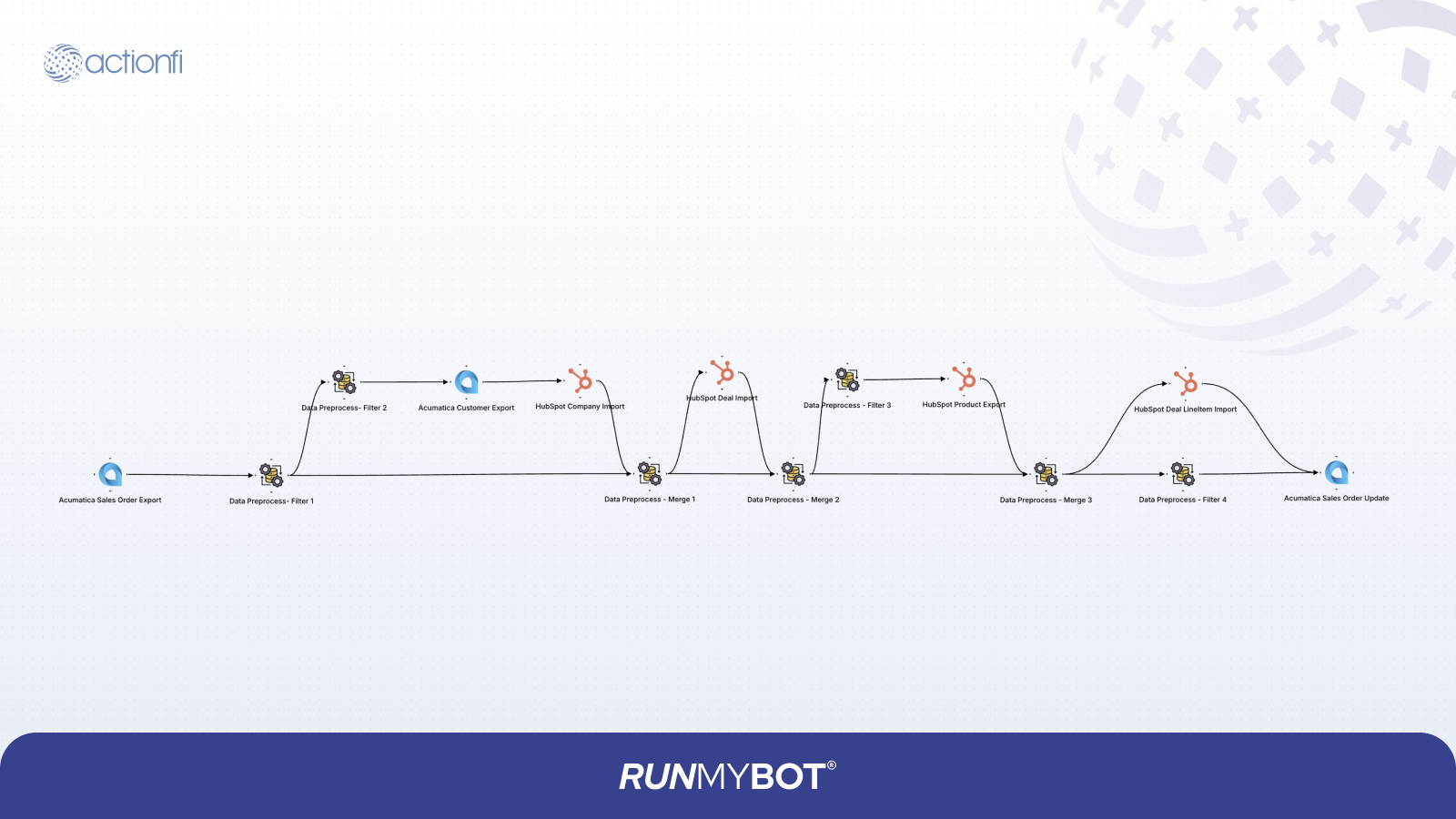
Company records created or updated in HubSpot are synchronized with Acumatica to keep customer master data consistent across both systems.
Connection: <Select HubSpot Connection>
Resource: Companies
Extract Type: All - Always extract all data
Include All Fields: True
Resource: Customer
Connection: <Select Acumatica Connection>
Import Type: Upsert
BaseUrl: https://<your-domain>/<instance-name>/entity
Tenant: Default
Version: 24.200.001
Look Up Fields: CustomerID.value
Field Mapping Table
| Source Data (HubSpot) | Target Data (Acumatica) | Description / Rules |
|---|---|---|
| properties.acumatica_customer_id | CustomerID.value | Acumatica Customer ID Reference |
| properties.name | CustomerName.value | Customer Name |
| properties.website | MainContact.WebSite.value | Main Contact Website URL |
| properties.phone | MainContact.Phone1.value | Phone Number |
| properties.address | MainContact.Address.AddressLine1.value | Address Line 1 |
| properties.city | MainContact.Address.City.value | City Name |
| properties.state | MainContact.Address.State.value | State / Province |
| properties.country | MainContact.Address.Country.value | Lookup Mapping: France - FR, United States - US, Canada - CA, India - IN |
| properties.zip | MainContact.Address.PostalCode.value | Postal Code |
| id | prev_data.HubspotID | HubSpot Record ID |
| SendDunningLettersbyEmail.value | Static: false |
8.2.2 HubSpot Contact to Acumatica Contact
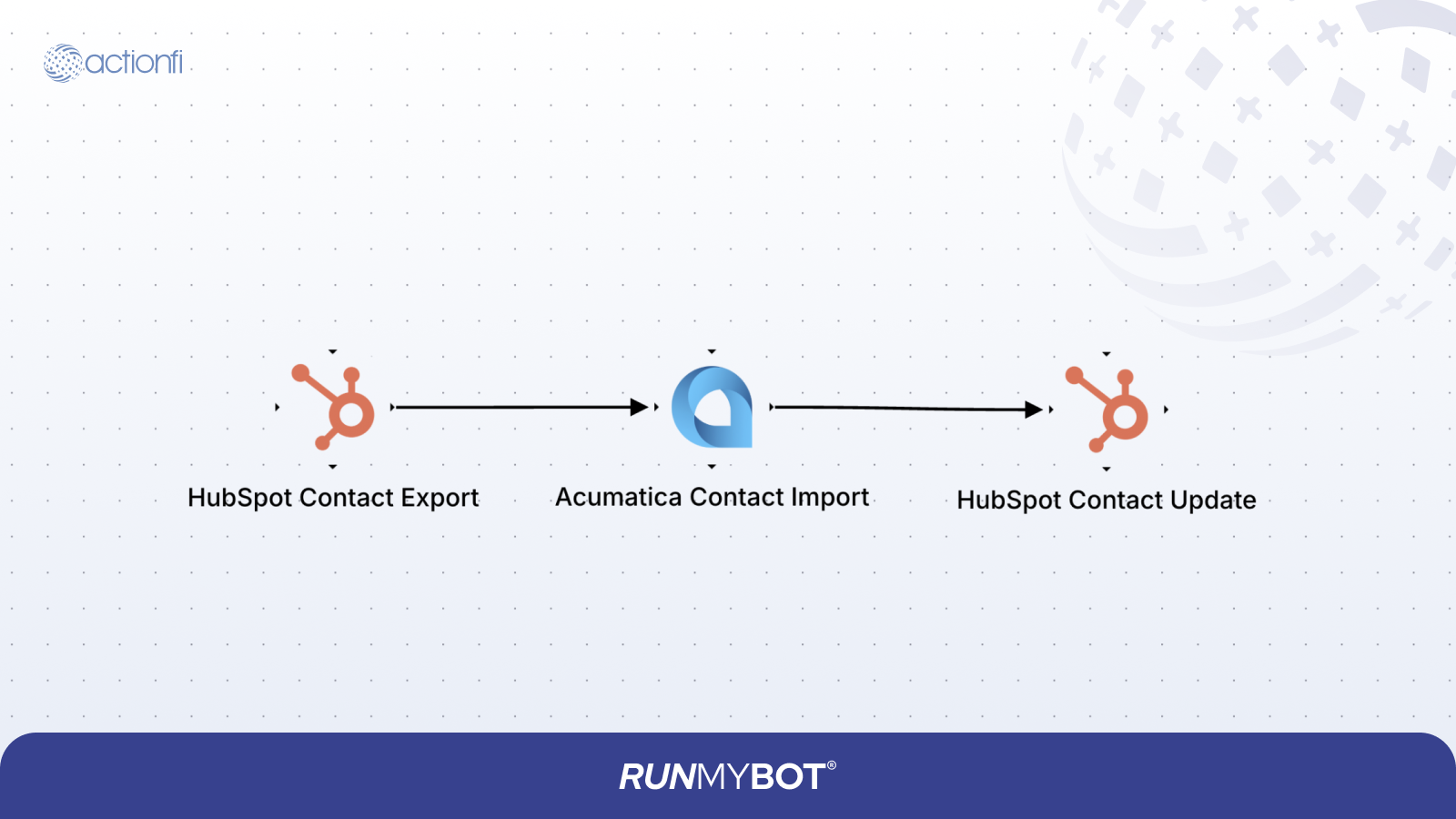
Contact records created or updated in HubSpot are synchronized to Acumatica to ensure customer contact information is consistent across both systems.
Connection: <Select HubSpot Connection>
Resource: Contacts
Extract Type: All - Always extract all data
Include All Fields: True
Connection: <Select Acumatica Connection>
Resource: Contacts
Import Type: Upsert
BaseUrl: https://<your-domain>/<instance-name>/entity
Tenant: Default
Version: 24.200.001
Look Up Fields: ContactID.value, Email.value
Field Mapping Table
| Source Data (HubSpot) | Target Data (Acumatica) |
|---|---|
| properties.jobtitle | JobTitle.value |
| properties.zip | Address.PostalCode.value |
| properties.country | Address.Country.value |
| properties.state | Address.State.value |
| properties.city | Address.City.value |
| properties.address | Address.AddressLine1.value |
| properties.fax | Fax.value |
| properties.mobilephone | Phone2.value |
| properties.phone | Phone1.value |
| properties.email | Email.value |
| properties.lastname | LastName.value |
| properties.firstname | FirstName.value |
| properties.acumatica_contact_id | ContactID.value |
| id | prev_data.HubspotID |
Update Configurations (HubSpot):
Resource: Contact
Method: Operation: Update, Directly By HubSpot ID: True
| Source Data | Target Data |
|---|---|
| ContactID.value | properties.acumatica_contact_id |
| prev_data.HubspotID | id |
8.2.3 Acumatica Customer to HubSpot Company
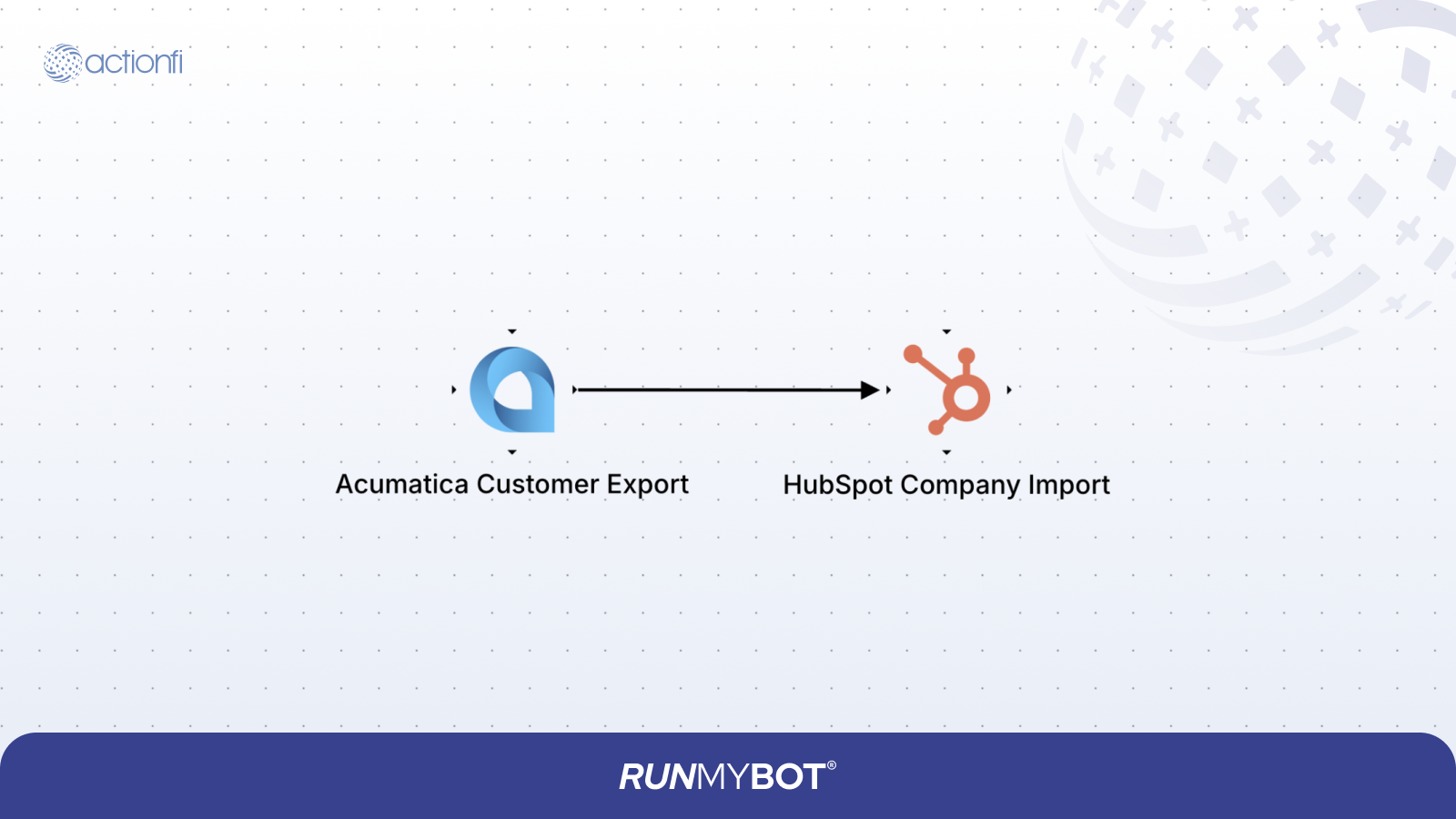
Customer records created or updated in Acumatica are synchronized to HubSpot to ensure master data remains consistent across both platforms.
Data Type: REST
Extract: Customers
Active: true
Detailed Data: True
Connection: <Select Acumatica Connection>
Extract Type: All - Always extract all data
BaseUrl: https://<your-domain>/<instance-name>/entity
Tenant: Default
Version: 24.200.001
Skip Response Wrapping: True
Connection: <Select HubSpot Connection>
Resource: Companies
Operation: Upsert
Directly By HubSpot ID: False
Lookup Condition: Lookup Field: properties.acumatica_customer_id, Operator: Equal, Source: Mapping
Field Mapping Table
| Source Data (Acumatica) | Target Data (HubSpot) | Description / Rules |
|---|---|---|
| CustomerName.value | properties.name | Customer Name |
| MainContact.Phone.value | properties.phone | Phone Number |
| MainContact.Address.AddressLine1.value | properties.address | Street Address |
| MainContact.Address.City.value | properties.city | City Name |
| MainContact.Address.PostalCode.value | properties.zip | Postal Code |
| MainContact.WebSite.value | properties.website | Website URL |
| CustomerID.value | properties.acumatica_customer_id | Acumatica Customer ID Reference |
| MainContact.Address.Country.value | properties.country | Lookup Mapping: US - United States |
8.2.4 Acumatica Contact to HubSpot Contact
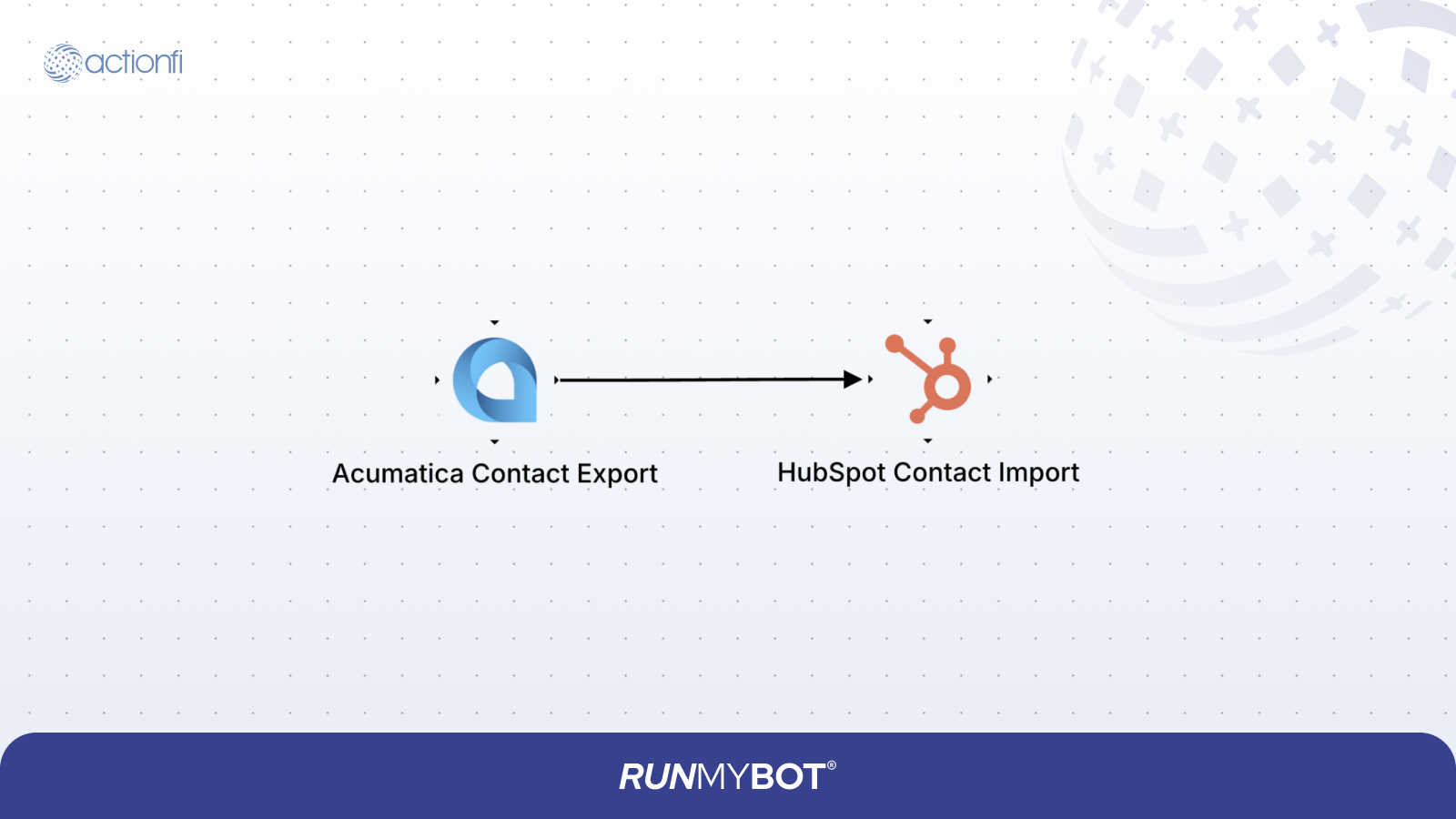
Contact records created or updated in Acumatica are synchronized to HubSpot. RUNMYBOT retrieves Contact data from Acumatica through REST APIs.
Data Type: REST
Extract: Contacts
Active: True
Detailed Data: True
Connection: <Select Acumatica Connection>
Extract Type: All - Always extract all data
BaseUrl: https://<your-domain>/<instance-name>/entity
Tenant: Default
Version: 24.200.001
Skip Response Wrapping: True
Connection: <Select HubSpot Connection>
Resource: Contacts
Operation: Upsert
Directly By HubSpot ID: False
Lookup Condition: Lookup Field: properties.acumatica_contact_id, Operator: Equal, Source: Mapping
Field Mapping Table
| Source Data (Acumatica) | Target Data (HubSpot) |
|---|---|
| ContactID.value | properties.acumatica_contact_id |
| FirstName.value | properties.firstname |
| LastName.value | properties.lastname |
| JobTitle.value | properties.jobtitle |
| Email.value | properties.email |
| Phone1.value | properties.phone |
| Phone2.value | properties.mobilephone |
| Address.AddressLine1.value | properties.address |
| Address.City.value | properties.city |
| Address.State.value | properties.state |
| Address.Country.value | properties.country |
| Address.PostalCode.value | properties.zip |
8.2.5 HubSpot Deal to Acumatica Sales Order
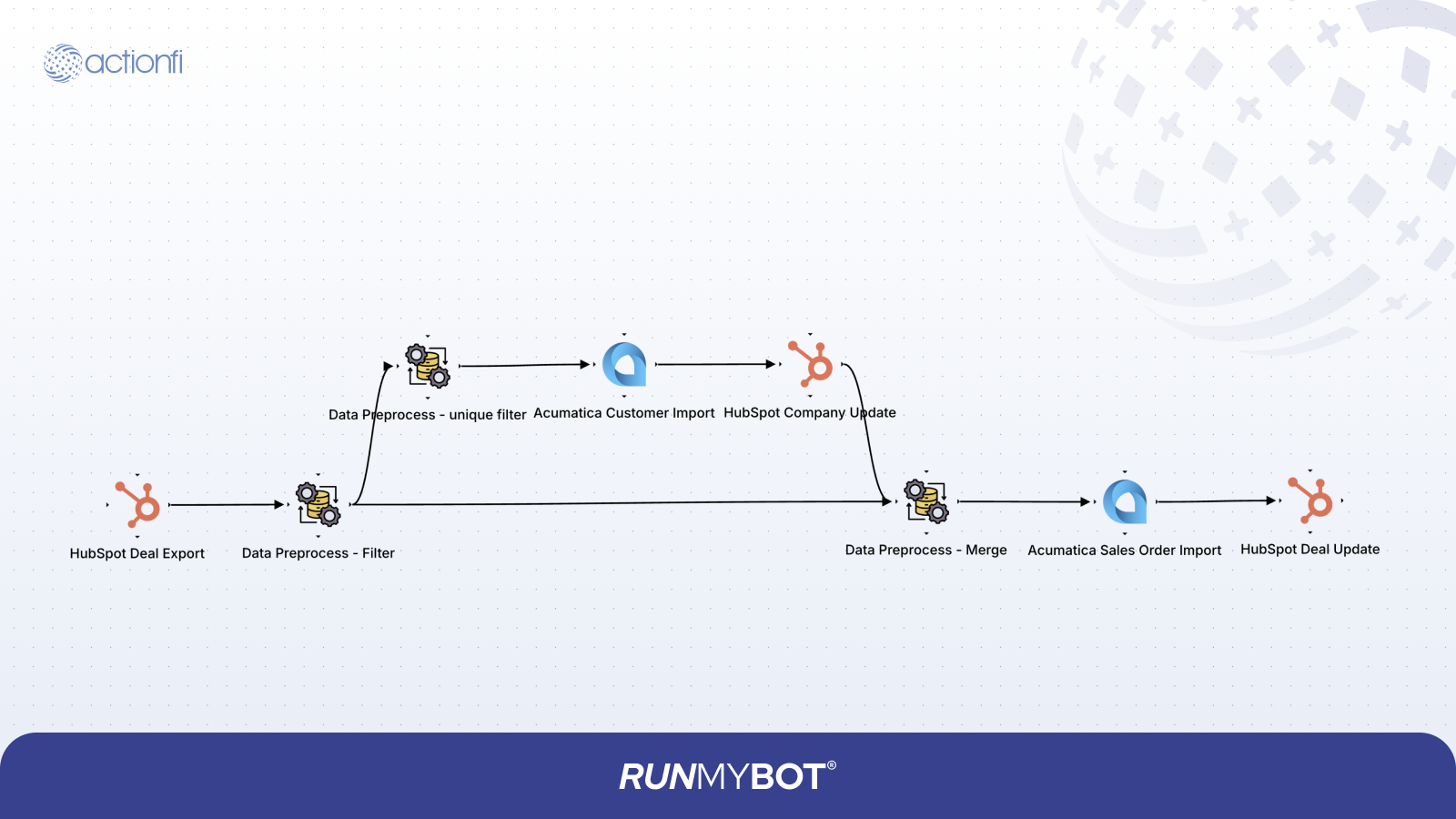
Closed Won HubSpot Deals are synchronized to Acumatica Sales Orders. RUNMYBOT retrieves Deal data, validates it, and performs the required mappings.
Connection: <Select HubSpot Connection>
Resource: Deals
Associations: Companies, Line Items
Extract Type: All - Always extract all data
Include All Fields: True
Enable Lookup: True
Lookup Condition: Lookup Field: StageName, Operator: Equal, Source: Static, Value: closedwon
Condition 1: Operation: Filter, Field Name: properties.acumatica_order_id, Condition: Is EMPTY
Condition 2: Operation: Filter, Field Name: line_items, Condition: Is Not Empty
Condition 3: Operation: Filter, Field Name: companies, Condition: Is Not Empty
Condition 1: Operation: Filter, Field Name: id, Condition: Unique
HubSpot Company to Data Preprocess Mapping
| Source Data | Target Data |
|---|---|
| properties.acumatica_customer_id | customer_id |
| hs_object_id | company_id |
Data Preprocess Mapping
| Source Data | Target Data |
|---|---|
| line_items | Details |
| properties.dealname | dealname |
| id | id |
| companies[*].id | company_id |
Connection: <Select Acumatica Connection>
Resource: Customer
Import Type: Upsert
BaseUrl: https://<your-domain>/<instance-name>/entity
Tenant: Default
Version: 24.200.001
Look Up Fields: CustomerID.value
Acumatica Customer Mapping Table
| Source Data (HubSpot) | Target Data (Acumatica) |
|---|---|
| properties.acumatica_customer_id | CustomerID.value |
| properties.name | CustomerName.value |
| properties.website | MainContact.WebSite.value |
| properties.phone | MainContact.Phone1.value |
| properties.address | MainContact.Address.AddressLine1.value |
| properties.city | MainContact.Address.City.value |
| properties.state | MainContact.Address.State.value |
| properties.country | MainContact.Address.Country.value |
| properties.zip | MainContact.Address.PostalCode.value |
| id | prev_data.HubspotID |
| Static: false | SendDummyLettersByEmail.value |
Connection: <Select HubSpot Connection>
Resource: Companies
Operation: Update, Directly By HubSpot ID: True
Operation: Merge, Join Type: Left Join, Split Field: customer_id, Left Data: WITHOUT SPLIT KEY PRESENT, Group By Fields: company_id
Resource: Sales Order
Connection: <Select Acumatica Connection>
Import Type: Create
BaseUrl: https://<your-domain>/<instance-name>/entity
Tenant: Default
Version: 24.200.001
Acumatica Sales Order Mapping Table
| Source Data (HubSpot) | Target Data (Acumatica) |
|---|---|
| Static: SO | OrderType.value |
| customer_id | CustomerID.value |
| dealname | Description.value |
| id | ExternalRef.value |
| Details[*].properties.price | Details[*].UnitPrice.value |
| Details[*].properties.acumatica_item_id | Details[*].InventoryID.value |
| Details[*].properties.quantity | Details[*].OrderQty.value |
| Details[*].properties.name | Details[*].LineDescription.value |
| id | prev_data.Hubspot_ID |
Connection: <Select HubSpot Connection>
Resource: Deal
Operation: Update, Directly By HubSpot ID: True
| Source Data | Target Data |
|---|---|
| OrderNbr.value | properties.acumatica_order_id |
| prev_data.Hubspot_ID | id |
8.2.6 Acumatica Sales Order to HubSpot Deal
Acumatica Sales Orders are synchronized to HubSpot Deals. RUNMYBOT retrieves Sales Order data, validates it, and performs the required transformations.
Data Type: REST
Extract: Sales Order
Active: True
Detailed Data: True
Connection: <Select Acumatica Connection>
Extract Type: All - Always extract all data
BaseUrl: https://<your-domain>/<instance-name>/entity
Tenant: Default
Version: 24.200.001
Condition: Operation: Filter, Field Name: ExternalRef.value, Condition: Is EMPTY
Condition: Operation: Filter, Field Name: CustomerID.value, Condition: Unique
Data Type: REST, Extract: Customers, Active: True, Detailed Data: True, Connection: <Select Acumatica Connection>, BaseUrl: https://<your-domain>/<instance-name>/entity, Tenant: Default, Version: 24.200.001, Look Up Keys: CustomerID, Skip Response Wrapping: True
Connection: <Select HubSpot Connection>, Resource: Companies, Operation: Upsert, Lookup Field: properties.acumatica_customer_id, Operator: Equal
HubSpot Company Mapping Table
| Source Data (Acumatica) | Target Data (HubSpot) |
|---|---|
| CustomerName.value | properties.name |
| MainContact.Phone.value | properties.phone |
| MainContact.Address.AddressLine1.value | properties.address |
| MainContact.Address.City.value | properties.city |
| MainContact.Address.PostalCode.value | properties.zip |
| MainContact.Website.value | properties.website |
| CustomerID.value | properties.acumatica_customer_id |
| MainContact.Address.Country.value | properties.country |
Operation: Merge, Join Type: Left Join, Split Field: company_id, Left Data: WITHOUT SPLIT KEY PRESENT, Group By Fields: CustomerID
Resource: Deals, Connection: <Select HubSpot Connection>, Operation: Create, Ignore Existing Records: True, Lookup Field: properties.acumatica_order_id, Operator: Equal, Source: Mapping
HubSpot Deal Mapping Table
| Source Data | Target Data |
|---|---|
| Name | properties.dealname |
| Amount | properties.amount |
| Static: closedwon | properties.dealstage |
| Name | properties.description |
| acumatica_order_id | properties.acumatica_order_id |
| company_id | associations[*].to.id |
| Static: HUBSPOT_DEFINED | associations[*].types[*].associationCategory |
| Static: 5 | associations[*].types[*].associationTypeId |
Connection: <Select HubSpot Connection>, Resource: Deal Line Items, Operation: Create
HubSpot Deal Line Item Mapping Table
| Source Data | Target Data |
|---|---|
| LineDescription | properties.name |
| OrderQty | properties.quantity |
| product_id | properties.hs_product_id |
| acumatica_order_id | properties.hs_sku |
| deal_id | associations[*].to.id |
| Static: HUBSPOT_DEFINED | associations[*].types[*].associationCategory |
| Static: 20 | associations[*].types[*].associationTypeId |
Resource: Sales Order, Connection: <Select Acumatica Connection>, Import Type: Update
| Source Data | Target Data |
|---|---|
| CustomerID | CustomerID.value |
| Static: SO | OrderType.value |
| ExternalRef.value | ExternalRef.value |
| acumatica_order_id | OrderNbr.value |
8.2.7 Acumatica Product to HubSpot Product
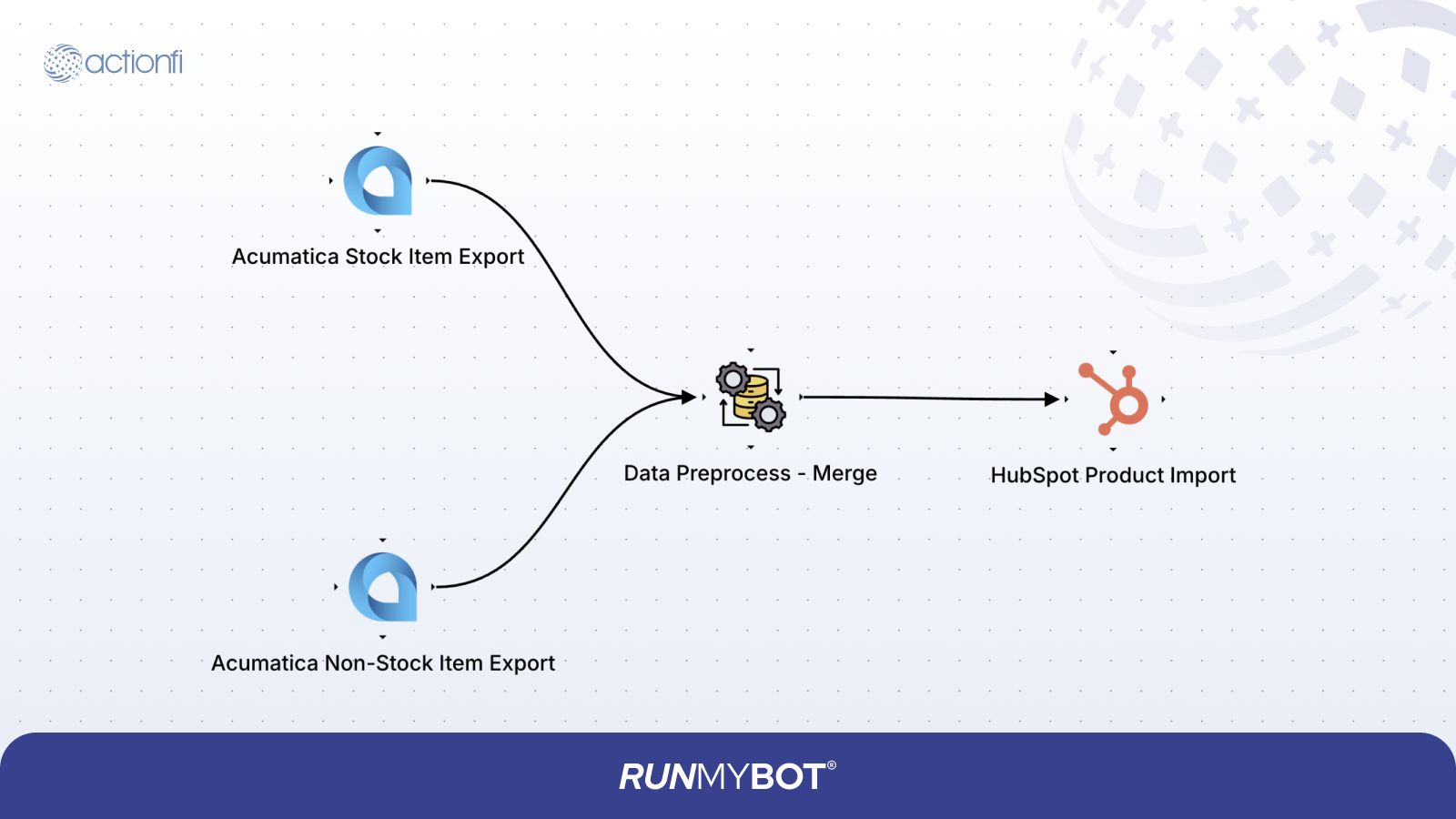
Product master records created or updated in Acumatica are synchronized to HubSpot to ensure that the CRM catalog has accurate description, SKU, and price details. RUNMYBOT extracts Stock Items and Non-Stock Items from Acumatica via REST APIs, filters out items without a default price, and upserts them into HubSpot Products.
Data Type: REST
Extract: Stock Item
Active: True
Connection: <Select Acumatica Connection>
Extract Type: All - Always extract all data
BaseUrl: https://<your-domain>/<instance-name>/entity
Tenant: Default
Version: 24.200.001
Stock Item Mapping
| Source Data | Target Data | Description / Rules |
|---|---|---|
| StockItem[*].InventoryID.value | StockItem[*].InventoryID.value | Item SKU / Inventory ID Reference |
| StockItem[*].Description.value | StockItem[*].Description.value | Product Description |
| StockItem[*].DefaultPrice.value | StockItem[*].DefaultPrice.value | Standard Price |
| StockItem[*].ItemType.value | StockItem[*].ItemType.value | Product Item Type |
Data Type: REST
Extract: Non Stock Item
Active: True
Connection: <Select Acumatica Connection>
Extract Type: All - Always extract all data
BaseUrl: https://<your-domain>/<instance-name>/entity
Tenant: Default
Version: 24.200.001
Non-Stock Item Mapping
| Source Data | Target Data | Description / Rules |
|---|---|---|
| Non Stock Item[*].InventoryID.value | Non Stock Item[*].InventoryID.value | Item SKU / Inventory ID Reference |
| Non Stock Item[*].Description.value | Non Stock Item[*].Description.value | Product Description |
| Non Stock Item[*].DefaultPrice.value | Non Stock Item[*].DefaultPrice.value | Standard Price |
| Non Stock Item[*].ItemType.value | Non Stock Item[*].ItemType.value | Product Item Type |
Condition: Operation: Filter, Field Name: DefaultPrice.value, Condition: Is Not Empty
Connection: <Select HubSpot Connection>
Resource: Product
Operation: Upsert
Directly By HubSpot ID: False
Lookup Condition: Lookup Field: properties.acumatica_item_id, Operator: Equal, Source: Mapping
HubSpot Product Import Mapping
| Source Data (Acumatica) | Target Data (HubSpot) | Description / Rules |
|---|---|---|
| InventoryID.value | properties.name | Product Name Reference |
| InventoryID.value | properties.hs_sku | SKU code |
| InventoryID.value | properties.acumatica_item_id | Acumatica Product ID Reference |
| Description.value | properties.description | Product Catalog Description |
| ItemType.value | properties.hs_product_type | Lookup Mapping: Service - service, Labor - service, Charge - service, Expense - service, Finished Good - inventory, Non-Stock Item - non_inventory |
| DefaultPrice.value | properties.price | Product Standard Price |
8.3 Custom Workflows
Custom workflows extend the integration features for financial transactions such as invoices and payments.
8.3.1 Acumatica Sales Invoice to HubSpot Sales Invoice
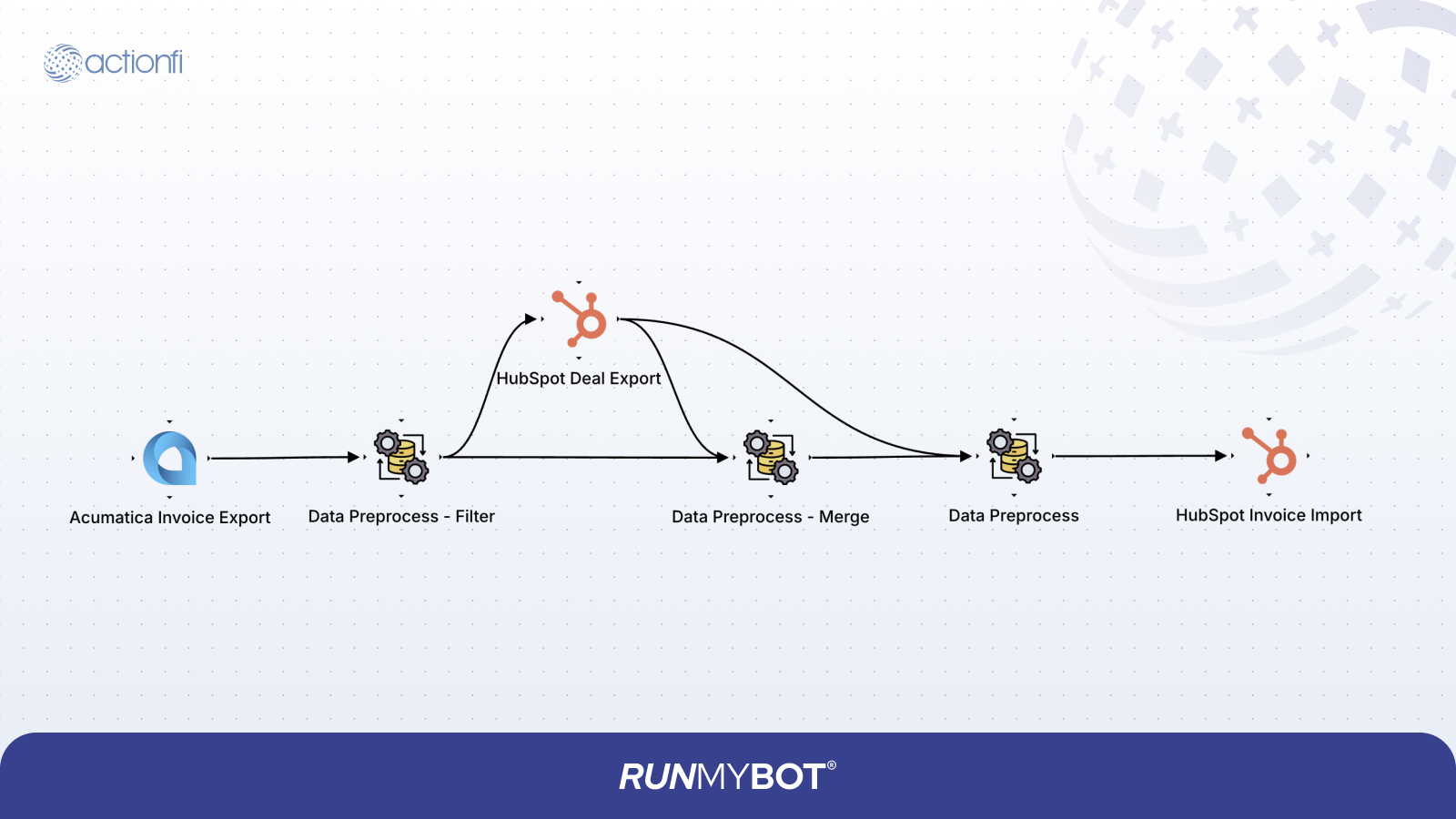
The Acumatica Sales Invoice to HubSpot integration retrieves invoice data from Acumatica, enriches it with HubSpot Deal and Company context, and imports the processed invoice into HubSpot custom objects.
Data Type: REST, Extract: Sales Invoices, Active: True, Detailed Data: True
Connection: <Select Acumatica Connection>
Extract Type: All - Always extract all data
BaseUrl: https://<your-domain>/<instance-name>/entity
Tenant: Default, Version: 24.200.001
Condition: Operation: Filter, Field Name: Type.value, Condition: Equals, Value: Invoice
Data Preprocess Filter Mapping
| Source Data | Target Data | Description / Rules |
|---|---|---|
| Sales Invoice | Sales Invoice | Filtered Invoices |
Connection: <Select HubSpot Connection>, Resource: Deals, Lookup Field: acumatica_order_id, Operator: Equal
HubSpot Deal Export Mapping
| Source Data | Target Data | Description / Rules |
|---|---|---|
| Details[*].OrderNbr.value | acumatica_order_id | Acumatica Order Number |
| ReferenceNbr.value | prev_data.ReferenceNbr | Reference Number |
Condition 1: Operation: Merge, Join Type: Left Join, Split Field: associations, Left Data: WITHOUT SPLIT KEY PRESENT, Group By Fields: ReferenceNbr
Condition 2: Operation: Filter, Field Name: associations, Condition: Is Not EMPTY
HubSpot Deal Export to Data preprocess Mapping
| Source Data | Target Data | Description / Rules |
|---|---|---|
| id | associations[*].to.id | HubSpot Deal ID Reference |
| properties.acumatica_order_id | OrderNbr | Acumatica Order Number |
| prev_data.ReferenceNbr | ReferenceNbr | Reference Number |
| associations[*].types[*].associationCategory | Static: USER_DEFINED | |
| associations[*].types[*].associationTypeId | Static: 21 |
Acumatica Invoice Export to Data Preprocess Mapping
| Source Data | Target Data | Description / Rules |
|---|---|---|
| Amount.value | Amount | Invoice Amount Value |
| DueDate.value | DueDate | Due Date Value |
| ReferenceNbr.value | ReferenceNbr | Reference Number |
| CreatedDate.value | CreatedDate | Created Date |
| Balance.value | Balance | Outstanding Balance |
| Details[*].OrderNbr.value | OrderNbr | Acumatica Order Number |
Condition 1: Operation: Merge, Join Type: Full Join, Group By Fields: ReferenceNbr
Data Preprocess Mapping
| Source Data | Target Data | Description / Rules |
|---|---|---|
| companies[*].id | associations[*].to.id | Company ID Reference |
| companies[*].properties.sap_company_id | sap_company_id | SAP Company ID Reference |
| companies[*].properties.name | company_name | Company Name Reference |
| properties.sap_reference_id | sap_reference_id | SAP Reference ID |
| prev_data.invoice_number | invoice_number | Invoice Number Reference |
| associations[*].types[*].associationCategory | Static: USER_DEFINED | |
| associations[*].types[*].associationTypeId | Static: 17 |
Connection: <Select HubSpot Connection>, Resource: Custom Object, Custom Object Name:
p246208318_sales_invoices, Operation: Upsert, Lookup Field: properties.invoice_number, Operator:
Equal
Field Mapping Table
| Source Data | Target Data | Description / Rules |
|---|---|---|
| ReferenceNbr | properties.external_ref_id | External Reference ID |
| Balance | properties.outstanding_amount | Outstanding Amount |
| Amount | properties.invoice_amount | Total Invoice Amount |
| DueDate | properties.due_date | Date Transform |
| CreatedDate | properties.invoice_date | Date Transform |
| ReferenceNbr | properties.invoice_number | Invoice Number Reference |
| associations | associations | Links to Deal & Company |
8.3.2 Acumatica Customer Payment to HubSpot Payment
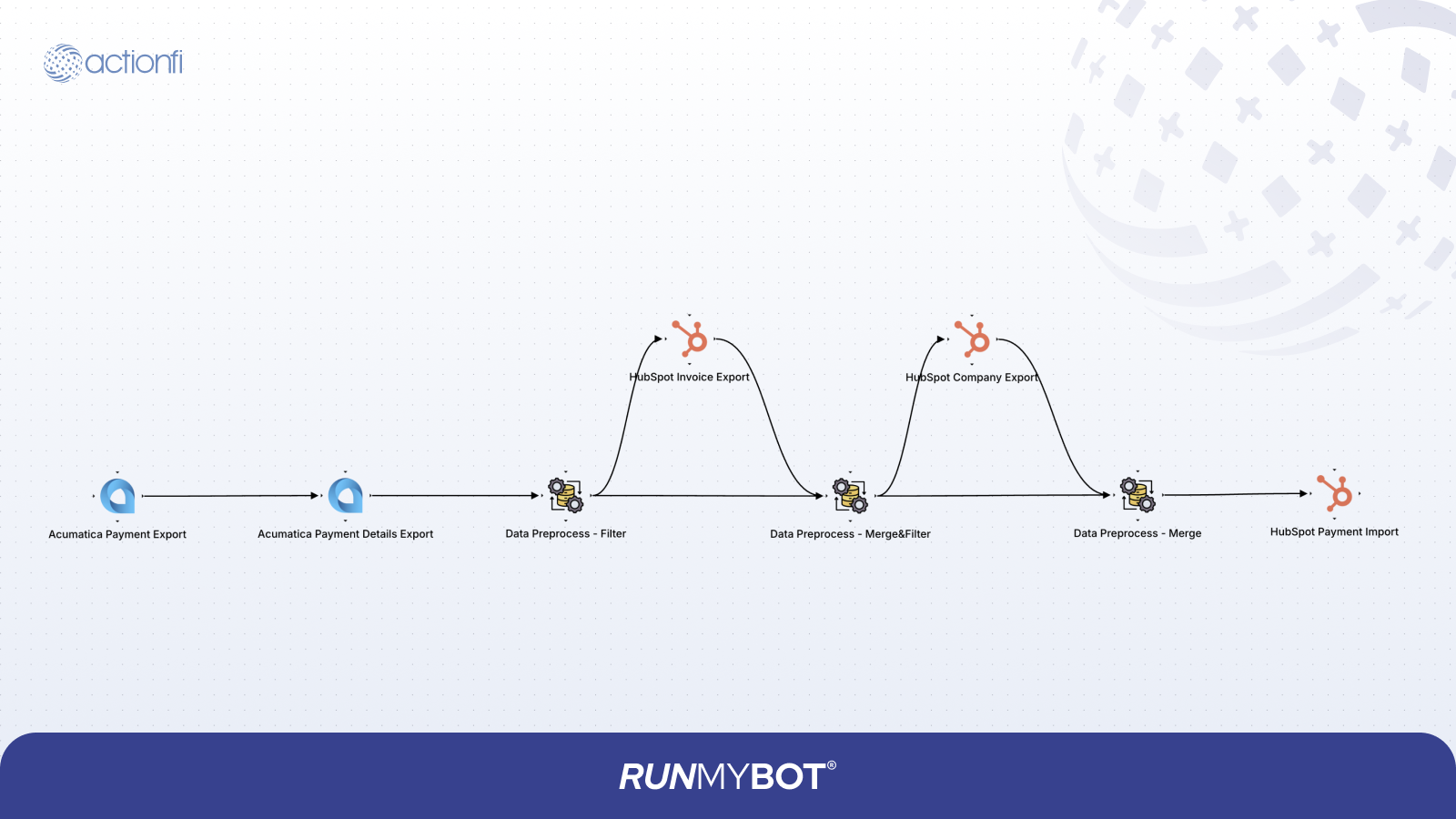
The Acumatica Customer Payment to HubSpot integration synchronizes payment records, links them to corresponding HubSpot Invoices, and updates HubSpot payments custom objects.
Data Type: REST
Extract: Payment Received
Active: True
Connection: <Select Acumatica Connection>
Extract Type: All - Always extract all data
BaseUrl: https://<your-domain>/<instance-name>/entity
Tenant: Default
Version: 24.200.001
Data Type: REST
Extract: Payment Details
Active: True
Detailed Data: True
Connection: <Select Acumatica Connection>
Extract Type: All - Always extract all data
BaseUrl: https://<your-domain>/<instance-name>/entity
Tenant: Default
Version: 24.200.001
Lookup Directly By Id: True
Key To Lookup: ReferenceNbr
Skip Response Wrapping: True
Acumatica Customer Payment Export Mapping
| Source Data | Target Data | Description / Rules |
|---|---|---|
| ReferenceNbr.value | ReferenceNbr | Reference Number ID Reference |
Condition: Operation: Filter, Field Name: invoice_number, Condition: Is Not Empty
Data Preprocess Filter Mapping
| Source Data | Target Data | Description / Rules |
|---|---|---|
| ApplicationHistory[*].AdjustedRefNbr.value | ApplicationHistory[*].invoice_number | Invoice Number Reference |
| ReferenceNbr.value | ApplicationHistory[*].payment_number | Payment Number Reference |
| PaymentAmount.value | ApplicationHistory[*].PaymentAmount | Payment Amount Value |
| Description.value | ApplicationHistory[*].description | Payment Description Memo |
| CashAccount.value | ApplicationHistory[*].CashAccount | Cash Account Code Reference |
| ApplicationDate.value | ApplicationHistory[*].ApplicationDate | Payment Application Date |
| CustomerID.value | ApplicationHistory[*].CustomerID | Customer ID Reference |
| Status.value | ApplicationHistory[*].Status | Payment Status Value |
Connection: <Select HubSpot Connection>
Resource: Custom Object
Custom Object Name: p246208318_sales_invoices
Extract Type: All - Always extract all data
Include All Fields: True
Enable Look Up: True
Lookup Condition: Lookup Field: invoice_number, Operator: Equal, Source: Mapping
HubSpot Invoice Export Mapping
| Source Data | Target Data | Description / Rules |
|---|---|---|
| invoice_number | invoice_number | Invoice Number Reference |
| payment_number | prev_data.payment_number | Payment Number Reference |
Condition 1: Operation: Merge, Join Type: Left Join, Split Field: associations, Left Data: WITHOUT SPLIT KEY PRESENT, Group By Fields: payment_number, invoice_number
Condition 2: Operation: Filter, Field Name: associations, Condition: Is Not EMPTY
HubSpot Sales Invoice Export to Data preprocess Mapping
| Source Data | Target Data | Description / Rules |
|---|---|---|
| id | associations[*].to.id | HubSpot Invoice ID Reference |
| properties.invoice_number | invoice_number | Invoice Number Reference |
| properties.invoice_amount | total_amount | Total Invoice Amount |
| associations[*].types[*].associationCategory | Static Category: USER_DEFINED | |
| associations[*].types[*].associationTypeId | Static Type ID: 39 | |
| prev_data.payment_number | payment_number | Payment Number Reference |
Connection: <Select HubSpot Connection>
Resource: Companies
Extract Type: All - Always extract all data
Include All Fields: True
Enable Look Up: True
Lookup Condition: Lookup Field: acumatica_customer_id, Operator: Equal, Source: Mapping
HubSpot Company Export Mapping
| Source Data | Target Data | Description / Rules |
|---|---|---|
| CustomerID | acumatica_customer_id | Acumatica Customer ID Reference |
| payment_number | prev_data.payment_number | Payment Number Reference |
Condition 1: Operation: Merge, Join Type: Full Join, Group By Fields: payment_number, invoice_number
Data preprocess Mapping
| Source Data | Target Data | Description / Rules |
|---|---|---|
| id | associations[*].to.id | HubSpot Company ID Reference |
| associations[*].types[*].associationCategory | Static Category: USER_DEFINED | |
| associations[*].types[*].associationTypeId | Static Type ID: 48 | |
| prev_data.payment_number | payment_number | Payment Number Reference |
| properties.name | company_name | Company Name Reference |
| prev_data.invoice_number | invoice_number | Invoice Number Reference |
Connection: <Select HubSpot Connection>
Resource: Custom Object
Custom Object Name: p246208318_customer_payments
Operation: Upsert
Directly By Id: False
Lookup Condition: Lookup Field: properties.payment_number, Operator: Equal, Source: Mapping
HubSpot Customer Payment Import Mapping
| Source Data (Acumatica) | Target Data (HubSpot) | Description / Rules |
|---|---|---|
| PaymentAmount | properties.amount_paid | Amount Paid Value |
| payment_number | properties.external_ref_id | External Reference ID |
| ApplicationDate | properties.transaction_date | Payment Date |
| Description | properties.note | Notes/Remarks |
| Status | properties.status | Lookup Mapping: Closed - Paid, Open - Open |
| payment_number | properties.payment_number | Payment Number Reference |
| total_amount | properties.total_amount | Total Invoice Amount |
| associations | associations | Links to Invoice & Company |
9 Exception Handling
Error handling is implemented across trigger, transformation, and action stages of each flow to ensure reliable synchronization:
- Validation: Checks identify missing mandatory fields, invalid data formats, and incorrect reference mappings before processing.
- Duplicates: Managed using external identifiers and upsert logic to prevent duplicate record insertion.
- Retries: Automated retry schedules for network interruptions, API timeouts, rate limits, or temporary service unavailability.
- Logging: All integration activities, payloads, and errors are logged inside the RUNMYBOT monitoring dashboard.